
This plugin offers various ways of improving Family Historian published Website or CD-DVD HTML pages.
Use the Browse to the Project … HTML folder button to select a …\….fh_data\Packages\…\data files folder in FH V7 or …\Public\FH Website or …\Public\FH CD-DVD\data folder in FH V6 or any equivalent HTML folder.
To be valid the folder must contain both the _nameindex.html and fhstyle.css files.
The improvement options are on several tabs:
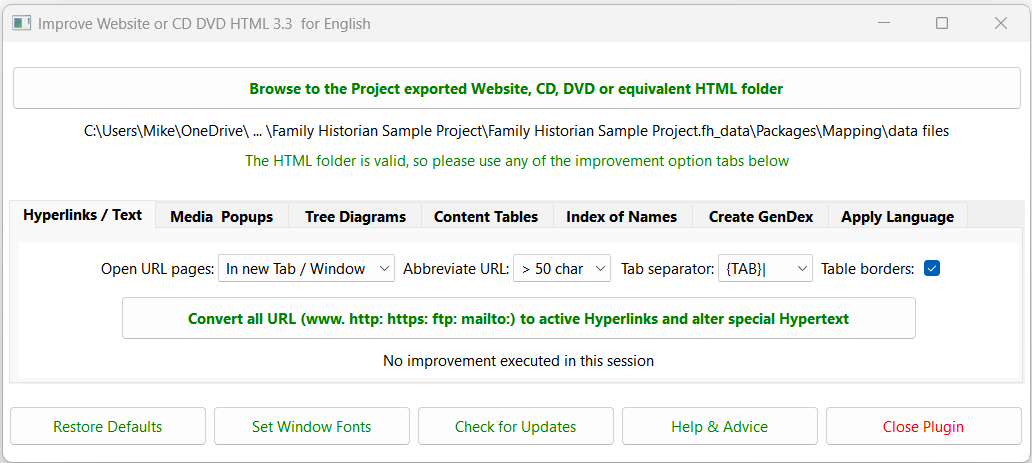
- Hyperlinks / Text Tab
Turn URL into Hyperlinks & alter some text styles. - Media Popups Tab
Offer various media file popup presentations. - Tree Diagrams Tab
Add family tree diagrams to feature pages. - Content Tables Tab
Add separate table pages for Contents items. - Index of Names Tab
Add search filter, alternate & married names, and idents. - Create GenDex Tab
Create a gendex.txt data file. - Apply Language Tab
Translate menus and headings to Default Output Language.
Use the Restore Defaults button to restore the installation defaults for all the options on each tab, and the GUI window positions and sizes centred on the FH window.
Use the Set Window Fonts button to Set Window Fonts and Colours.
Use the Check for Updates button to discover if a later version is in the Plugin Store.
Use the Help & Advice button to display these online help pages, and the Close Plugin button to close the plugin.
Plugin Improve Website or CD DVD HTML
Help content on this page is owned and provided by Mike Tate, the plugin's author, Calico Pie takes no responsibility for its content.